Jenn's Generally Good Game Production Advice
A game producer’s guide to setting up a risk register to track your fears
Published:
Stop staying awake at night worrying!! Create a risk register to help track all your game development fears.

The Question:
You’ve mentioned risk registers in several of your advice posts. How do you like to set them up and use them?
Worried Producer
Read:
There’s a lot to be worried about in game development: so many things can go wrong. Instead of staying up at night going through the list of your fears, write them down during the day so you can keep the worrying in the correct time zone!
The best way I’ve found to write down fears and to track them is by using a risk register.
What is that? That’s what we’ll be looking at today. We’ll go into the details of what makes a “good” risk, all the properties to document, how to monitor your register, and engaging plans to reduce risks.
Let’s start with WHY you should use a risk register
If you’re not aware of the specific risks for your game then you’ll probably be surprised by something that you could have avoided easily.
Trying to list all imaginable risks and fears for your game’s development would be either impossible, impractical, or a waste of time.
BUT you can list all the things that are mostly likely to go wrong or that would have the biggest impact on your particular game. Then you can brainstorm what can be changed to reduce impact and probability now, in the future, or that can’t be changed.
Once you have a list, you can then check in on the risks to see how they’re changing. Hopefully the overall risk will go down and eventually you’ll realise something isn’t a risk anymore. On the other hand, seeing how a risk is changing can help you know that a risk is becoming more likely and you need to divert resources to addressing it sooner rather than later.
Overall: a risk register will reduce chaos and increase your odds of shipping a game on time and on budget with a happy team.
What sort of risks should we track?
Some risks are better than others. What does that mean?
A well-defined risk description is one that will lead to you being able to take action to reduce the impact or probability of it.
A bad risk is one that doesn’t give enough information for you to do anything at all about it (other than worry that is)
Let’s look at an example:
- BAD description: Our game won’t be any good.
- BETTER description: Our game won’t appeal to our target demographic of women in their 20s to 40s which means our game won’t sell.
- BEST description: The jumping mechanic won’t appeal to our target demographic of women in their 20s to 40s which means our game won’t sell.
In that example you can see how a general worry that all game developers face and that’s not really addressable can be turned into something specific to your game and that will give you concrete action points such as scheduling a playtest of jumping with your target demographic.
A good risk description should get to the source of the problem. It should be focused and not a general malaise. It should be clear WHY this is a negative thing within the description. All of that will help make sure the entire team understands the risk and can also brainstorm ways to reduce impact and probability.
Some risks are out of your control entirely. For example, being worried about another company releasing a similar game before you can release your game. I’m a firm believe in not worrying about things I can’t change. BUT, in this case you should still put the risk in your register because although you can’t reduce the probability of the risk happening you can look at ways to reduce the negative impact it would have on your project. And even if you can’t change the impact, you can create a plan to deal with this risk if it does happen. That way you can just execute on your plan rather than scrambling and losing precious time when the worst happens.
The register itself: what to track
The most basic register just has a list of risks or fears. You can layer more onto this. BUT only do that if you’ll use that information and keep it updated.
Other than the initial description, I have 10 properties I like to track. I’m going to explain them all using an example. This example is taken from a hypothetical platformer game about birds. In this game there are a lot of different birds that need to be animated. The bird shapes are likely to be unique enough that we’ll need multiple rigs to animate the birds. This will add a lot of time to the development.
So let’s look at how the properties go for this risk:
- Risk description: Different birds are too unique in terms of rigging and take too long to animate.
- Impact: where 0 is no impact and 5 is the game won’t be able to ship.
- Impact: 3. Since the game is all about birds reducing the total types of birds would be pretty impactful. It would make the game less realistic and less visually impressive and would change the story and how gameplay mechanics are taught to the player (since in this game different birds teach the player different abilities).
- Probability: where 0 is it definitely can’t happen and 5 is it’s already happening right now or it’s basically certain to happen in the future.
- Probability: 4. It’s pretty likely this is going to be an issue. We already have a list of our birds and we can see that their shapes are dissimilar.
- Total Risk: a calculation that’s just multiplying impact and probability. Gives you a number out of 25.
- Total Risk: 12. That happens to put it in our top 5 risks for this game.
- Alert Status: What should we be doing about it right now? What is our panic level?
- I like to use:
- Actively fixing
- Watch Closely
- Standard Monitoring
- Ignore for Now
- Closed
- For our example: Actively Fixing. Since we’re doing action items that should reduce and eliminate this risk entirely.
- I like to use:
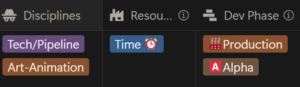
- Optional: Categories to help classify the risk. This will help you group all the risks that are coming up to focus on a subset rather than a big overwhelming list. I like to note down: disciplines affected, resources affected, development phase where this risk is most worrying.
- Trigger conditions: What could happen that would mean the risk is actually happening or increasing?
- Trigger conditions:
- We have over 5 different rigs that we need for the birds.
- Rigging a new bird shape takes over 3 weeks.
- Long term prediction says we won’t have enough time for all the anticipated rigs.
- Trigger conditions:
- Mitigation Plans: What can we do to reduce the impact or probability of this happening?
- Mitigation plans:
- Calculate how many rigs we’ll need.
- Test how long each rig will take to be created by creating at least 2 rigs.
- Identify birds where we could tweak existing rigs rather than starting from scratch each time.
- Mitigation plans:
- Contingency Plans: If this happens (e.g a fire has started) what can we do (to put out the fire)?
- Contingency Plans:
- Change which birds we use so that the chosen birds use the same rig with different skins.
- Adjust bird-shapes to be slightly unrealistic so that they can fit an existing rig.
- Reduce amount of animation a specific bird has so that you don’t notice the less than perfect rig.
- Contingency Plans:
- Status History: how has the risk changed and what have we done about it? It’s ok to put here “no change” just to identify that the risk was looked at again.
- Status Updates:
- 7 Jan 2025: Risk identified
- 4 Feb 2025: Probability increased. Shapes of birds listed. Starting a test rig.
- 4 Mar 2025: No new information. Still working on test rigs.
- Status Updates:
Here’s how the full row looks

You can see more examples in a risk register I’ve put together for that hypothetical bird game: link here.
What’s next? Monitoring Risks
Creating your risk register can take a bunch of time initially. Remember to get your whole team involved so everyone’s risks are captured. Give yourself a pat on the back for getting it done.
BUT: don’t then forget about the document. There’s not much point doing all that work if you don’t check in regularly to see what’s changing and maintain it.
A producer should always have the risks in the back of their mind. They should explicitly check the risk register at least once a month for most risks. For actively fixing risks, you should aim to check more frequently.
You can also make other team members the owner of a risk and set the expectation that they’ll check in on their risks regularly. This helps spread the burden when production is getting overloaded and also increases the engagement of the team.
What does a check in entail?
- You look at whether the impact and probability have changed first and foremost.
- Take a look at the trigger conditions to see if any of them are happening now or are likely to happen in the near future.
- Consider whether you need to update triggers, mitigations, and contingencies based on tasks the team has completed or because you can think of new triggers or plans.
- Be honest about what’s going on and how it’s changing.
- Throw out risks that aren’t useful anymore.
- Don’t be afraid to update risks and make small tweaks.
- Make a note of the date of your check in even if nothing has changed so that everyone knows the risk has been looked at and see its history.
- Add in any new risks that have come up since your last check in that haven’t been documented.
Consider whether you need all the details that I’ve got in my risk register. More details look good, but if that makes it feel too hard to update then pick and choose what works for your team.
There’s no point having a risk register that’s static and doesn’t change. A good risk register will help your team stay on top of big picture issues by creating and informing team tasks and priorities.
Engaging your mitigation and contingency plans
Since you are monitoring your risk trigger conditions, you’ll know when one of them is happening. So that’s when you’d start contingency plans.
Until then, figure out if you should be actively fixing the risk. That is, is this risk important right now in this development phase? Choose at most 5 risks to actively fix at any one time. If you try and choose more, people will get overwhelmed and nothing will be addressed.
If you’re actively fixing this risk then you’ll be doing your mitigation plans. If you don’t need to actively fix a risk, you’ll be able to ignore the risk for right now and get on with more pressing issues, like sleeping at night.
Summary tips
- Talk about risks regularly in team meetings and 1:1s.
- Don’t have too many risks since that will mean you get overloaded and do nothing.
- Make risks actionable. If you can’t control the risk (aka reduce the probability), you can still consider how to reduce impact or create contingency plans.
- Encourage everyone on the team to raise risks at any point, even if they have no idea how to fix it.
- Don’t bother creating a risk register if you don’t maintain it or it’s not giving you actionable tasks to do to reduce risks.
- Instead just have regular calls where you ask what is scaring people right now. Sometimes a more loose structure can get better results than a rigid risk register will.
- A risk register can be powerful tool, but equally it can be a waste of time if it’s not used. So try and predict that before spending time creating one.
That’s it for today. Thanks for reading!
Remember: This is general advice and it might not be right for you and your team, even if you’re the one who wrote in the question! For me to help better, it needs to be a dialog between me, and you, and your entire team. You can hire me to consult for you —> jennsand.com .
If you have a question for me, just fill in my form over here: jennsand.com/askjenn/